Back to Home to display all posts.
Showing posts with label DevSecOps. Show all posts

12/12/2023

Become a DevOps Engineer with the Dynamic DevOps Roadmap - Career

Dynamic DevOps Roadmap

A couple of months ago, I discussed why all linear DevOps learning roadmaps are broken by default (like roadmap.sh/devops)! In that post, I've discussed the issue, where it comes from, and the solution I tried for over 5 years!

The solution is simply switching to an MVP-style learning roadmap where you learn in iterations and touch multiple parts simultaneously (not necessarily equally). Each iteration should focus on a primary topic while exploring related side topics. So after a month, you already know about each topic in the roadmap, and after the 2nd month, you have the basics, and after the 3rd month, you have a good base, and so on.

Based on my mentorship experience in the last 5 years, I've concluded that any "tool-based" approach to deal with DevOps will fail miserably. The Cloud-Native landscape is getting bigger and bigger every day, and there is no way to deal with it that way.

For that reason, I've reviewed all docs from the previous mentorship docs I held in the past (I worked with people starting their first job, career shift, or moving to another work style or company) and built the ultimate missing solution!

⭐ Check out the Dynamic Roadmap content ⭐

This roadmap is polymorphic, which means it's designed to work in different modes. It depends on how fast you want to go.

  1. Self-Learning Course: In this mode, you are not expected to have DevOps experience, and you want to go from zero to hero, transforming your knowledge to land your first job as a DevOps Engineer.
  2. Hands-on Project: In this mode, you have some experience with DevOps (usually between 1-2 years of work experience), but you want to step up your skills with real hands-on industry-grad projects to learn DevOps in a pragmatic manner.
  3. Mentorship Program: In this mode, the previous two modes are covered (that means it could be only for the project or the whole roadmap) but with support from a mentor! The project will provide you with a DevOps expert who will guide you in following up on your progress and personalizing your learning plan.

The whole idea is about the Learning by Doing method (aka Problem-based Learning), which is done in iterative phases where you learn as you go and cover the whole DevOps cycle like Code, Containers, Testing, Continuous Integration, Continuous Delivery, Observability, and Infrastructure.

The project is a work in progress; more details are in the status section.

I hope that the project helps more people start their DevOps engineering careers! The market is thirsty for it already!

⭐ Check out the Dynamic Roadmap content ⭐

Happy DevOps-ing :-)

Continue Reading »

08/08/2023

Helm chart keyless signing with Sigstore/Cosign - DevSecOps

Software supply chain security has been one of the hot topics because of the continues attacks and exploits shown in the latest few years. So having a proper security practices like signing artifacts in today's CI/CD pipeline is not a luxury! Which became a standard DevSecOps practice.

However, for a long time it needed a lot of work to implement those practices, hence, projects like Open Source Security Foundation (OpenSSF) which created security framework like Supply-chain Levels for Software Artifacts (SLSA) and Sigstore which created tools like Cosign to standardize and reduce that fatigue.

Today I want to shed some lights on Helm chart signing with Cosign (part of Sigstore project). This post will focus on GitHub Actions and 2 ways for Helm chart signing based on the type of the Helm registry (simple or OCI-based).

1. Intro

Before starting, what is actually Cosign? I will start with quoting from the project website:

Cosign is a command line utility that can sign and verify software artifact, such as container images and blobs.

Cosign aims to make signatures invisible infrastructure, and one of its main features what's known as "Keyless signing". Keyless signing means rather than using keys like GPG/PGP, it uses associates identities via OpenID Connect (i.e. it auth against providers like Microsoft, Google, and GitHub to issues short-lived certificates binding an ephemeral key).

Cosign could be used as a CLI also integrated part of other build/release tools like GoReleaser.

2. Identity setup

As mentioned, no need for signing keys here, Cosign will use the identity context like GitHub. Let's take GitHub Actions as a base here, but it is worth mentioning that Cosign works with many identity providers.

From the GitHub Actions workflow point of view, you just need to have job permission id-token: write, which allows the job to use OICD and generate JWT (which works as a key).

name: Sign Helm chart artifact
[...]
jobs:
  sign:
    name: Sign
    permissions:
      id-token: write
    [...]

You can find a full example in the repo: https://github.com/DevOpsHiveHQ/cosign-helm-chart-keyless-signing-example

3.1. Keyless signing for simple Helm repository

A simple Helm repository is just a file called index.yaml which reference to the actual chart files URLs. A popular way for that is using Chart Releaser to host the Helm charts using GitHub Pages and Releases.

The simplest way to sign Helm chart using Cosign is to sign the artifact then upload the signature to GitHub release page.

First, sign the chart file:

# For explicitly, it's also possible to add '--oidc-provider=github-actions',
# but no need for that, cosign will discover the context if the GH job permission is correct.
cosign sign-blob my-app-1.0.0.tgz --bundle my-app-1.0.0.tgz.cosign.bundle

That will create a bundle file my-app-1.0.0.tgz.cosign.bundle which contains signing metadata like the signature and certificate (also it's possible to have separate sig and pem files) which should be uploaded to GitHub release page.

Now anyone can download the Helm chart file and Cosign bundle file to verify its integrity:

cosign verify-blob my-app-1.0.0.tgz \
  --bundle my-app-1.0.0.tgz.cosign.bundle \
  --certificate-oidc-issuer "https://token.actions.githubusercontent.com" \
  --certificate-identity "https://github.com/DevOpsHiveHQ/cosign-helm-chart-keyless-signing-example/.github/workflows/sign.yaml@refs/heads/main"

If the file is valid the command will show Verified OK, otherwise it will show something like Error: none of the expected identities matched what was in the certificate ....

On the other hand, that's still some work! Maybe if Chart Releaser has a native support for Cosign. Also, the Helm plugin helm-sigstore could help a bit but you need to download the Helm plugin first.

3.2. Keyless signing for OCI-based Helm repository

Using container image to store config like Helm chart or Terraform module is one of the brilliant ideas.

One of the biggest changes in Helm 3 was ability to use container registries with OCI support to store and share chart packages. It started as an experimental feature, but by Helm v3.8.0, OCI support is enabled by default.

So instead that simple index.yaml an OCI-based registry could be used as a Helm repository and chart storage too. Any hosted registries that support OCI will work for that like Docker Hub, Amazon ECR, Azure Container Registry, Google Artifact Registry, etc.

In that setup, Cosign works a bit differently where it signs the chart as an OCI image (the same way it signs the Docker images) and store the signature in the OCI repository. But in that case it only makes sense to sign the digest not the tags since the digest is immutable.

There are two steps to make that, first push the chart to an OCI-based Helm repository which generates the chart digest, then push the signed digest.

# After login to the registry using "helm registry login ...".
helm push my-app-1.0.0.tgz oci://ttl.sh/charts &> push-metadata.txt

CHART_DIGEST=$(awk '/Digest: /{print $2}' push-metadata.txt)
cosign sign -y "ttl.sh/charts/my-app@${CHART_DIGEST}"

Finally, to verify that:

cosign verify "ttl.sh/charts/my-app@${CHART_DIGEST}" \
  --certificate-oidc-issuer "https://token.actions.githubusercontent.com" \
  --certificate-identity "https://github.com/DevOpsHiveHQ/cosign-helm-chart-keyless-signing-example/.github/workflows/sign.yaml@refs/heads/main"

4. Recap

Nowadays, it's critical to have standard DevSecOps practices in the whole SDLC, and validating integrity is one of the most essential practices in securing the software supply chain.

Any publicly distributed artifact should be signed to ensure the origin of it, and Helm charts are no different. Cosign keyless signing made it much easier to apply such practices without the hassles of managing singing keys.

Continue Reading »

02/07/2022

Kubernetes Security Best Practices with tips for the CKS exam - Presentation

At the end of last year (2021), and after a couple of years of Kubernetes production hands-on, I found that it was time to dive more into Kubernetes security, and after a lot of reading and practising, I got my CKS certificate. Also, for the last 3 quarters, security was one of the focus areas in my team, and I was taking care of it.

For that reason, I decided to consolidate that into a session which is a combination of Kubernetes Security Best Practices and tips for the Certified Kubernetes Security Specialist (CKS) exam to share the knowledge in my team as well across teams.

The session is just 15 Min in total. The first 6 Min are for everyone and the rest for Kubernetes specialists or anyone who wants to dive more into Kubernetes security topics. If you are just interested in the tools, then jump to section #5 Kubernetes Security Starter Kit. If you are just interested in the CKS exam tips, then jump to section #6 CKS Exam Overview and Tips.

Agenda:

  1. Introduction
  2. Shift-left and DevSecOps
  3. General Security Concepts
  4. The 4C's of Cloud Native Security
  5. Kubernetes Security Starter Kit
  6. CKS Exam Overview and Tips

Note: If you want more details about CKS, checkout my previous post for more info Now I'm a Certified Kubernetes Security Specialist + exam tips.


The recording of Kubernetes Security Best Practices session

Overview:

A dive into Kubernetes Security Best Practices and tips for the Certified Kubernetes Security Specialist (CKS) exam.

The 1-3 sections are for everyone and will cover the container era's security. So it doesn't matter your title or background; they are a good start for anyone.

The 4-6 sections will dive more into Kubernetes security, so DevOps engineers and SREs will probably find that more interesting. But in general, anyone interested in Kubernetes security is more than welcome.


That's it, enjoy :-)

Continue Reading »

01/11/2021

Now I'm a Certified Kubernetes Security Specialist + exam tips

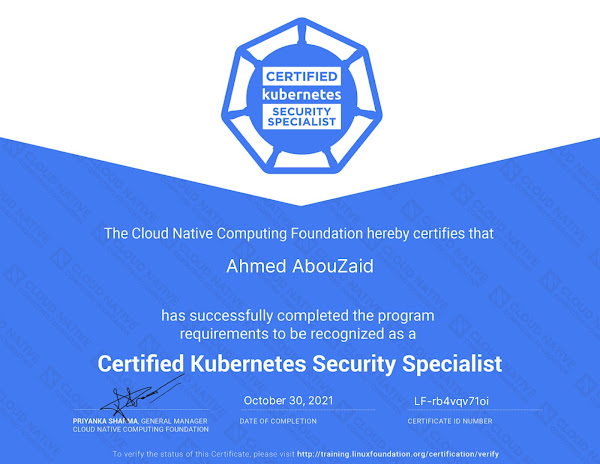
On Saturday 30.10.2021 and in less than 24 hours of the exam, I got an email that I passed the CKS exam on the first try and I'm now a Certified Kubernetes Security Specialist. So now I have the 3 Kubernetes certificates (CKA, CKAD, and CKS). 🎉🎉

So is it now DevSecOps? 😄️ Well ... let's take a look on some details about the "why" of getting a certificate.

Continue Reading »
Powered by Blogger.

Hello, my name is Ahmed AbouZaid, I'm a passionate Tech Lead DevOps Engineer. 👋

I specialize in Cloud-Native and Kubernetes. I'm also a Free/Open source geek and book author. My favorite topics are DevOps transformation, DevSecOps, automation, data, and metrics.

More about me ➡️

Contact Me

Name

Email *

Message *

Start Your DevOps Engineer Journey!

Start Your DevOps Engineer Journey!
Start your DevOps career for free the Agile way with the Dynamic DevOps Roadmap ⭐

My Latest Peer-reviewed Research Paper

My Latest Peer-reviewed Research Paper
Building a Modern Data Platform Based on the Data Lakehouse Architecture and Cloud-Native Ecosystem

Latest Post

10 Helm Chart Development Best Practices - Kubernetes

About 10 years ago, I used SaltStack extensively and wrote my top 10 best practices for SaltStack formulas . Today, I do the ...

Popular Posts

Blog Archive