Back to Home to display all posts.
Showing posts with label Kustomize. Show all posts

31/12/2023

2023 Highlights


Image generated with Craiyon.

Finally, 2023 is over! What a year! One more crazy year, but it was the culmination of many actions I've started previously.

Starting with the fun facts ... this is the post no. 100!

After 9 years of tech blogging in English (I had another 10 in Arabic before that). It should be 108 posts since the plan was to post 1 per month, but I missed some, still not bad!

Top 5 highlights in 2023

1. Career

Image by vectorjuice on Freepik

In 2022, I formed the Distribution team at Camunda which is responsible for building and deploying the Camunda Platform 8 Self-Managed which is an umbrella Helm chart with 10+ systems. In 2023, the biggest challenge was increasing the team headcount to 4 and building the workflow to handle that!

2. Academia

I've always been into data! So in 2020, I started a part-time master's in Data Engineering at Edinburgh Napier University. After almost 3 years, I was awarded a Master of Science with Distinction in Data Engineering ๐ŸŽ‰. In June, I got the result after I successfully defended my dissertation titled Modern Data Platform with DataOps, Kubernetes, and Cloud-Native Ecosystem. Then in October, I traveled to Scotland to attend the graduation ceremony. All I can say today is that it was a great experience by all means! (and that's actually why I had some unusual gaps in blog posts in 2023 because I was working on the master's thesis).

3. Mentorship

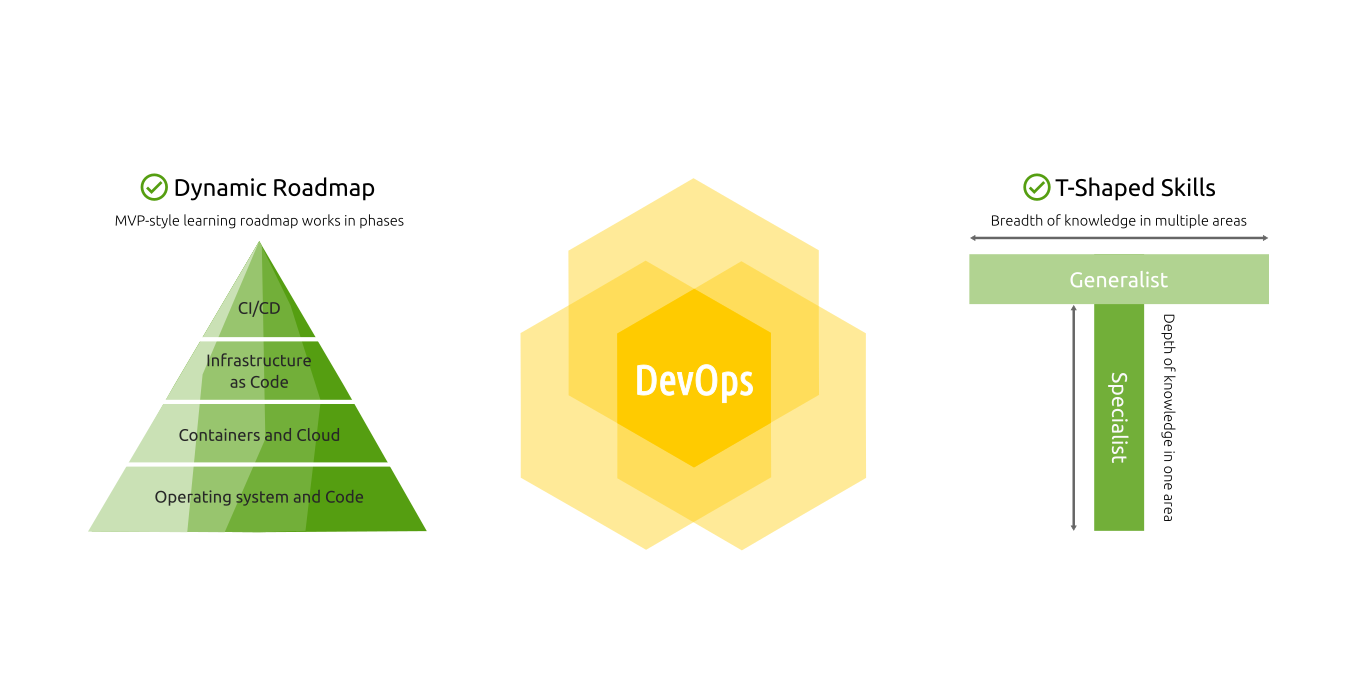
Dynamic DevOps Roadmap

In the last 5 years, I mentored many people in different career stages (starting their first job, career shift, moving to another work style or company). Almost every day, I see people struggling on their way to the DevOps field. I already wrote why the DevOps linear roadmaps are broken by default! So I decided to fix that and launched a Dynamic DevOps Roadmap to become a DevOps Engineer which under the DevOps Hive identity! The nice thing that I saw many people already like the idea and want to do it that way!

โ„น️ Check out the Dynamic Roadmap content โ„น️

4. Public Speaking

Jobstack is one of my favorite tech events all the time! And as usual, this year was awesome! As a speaker, I had 2 sessions, and as an attendee, I enjoyed many sessions on different topics.

5. Activities

Besides these highlights, I had some nice stuff during the year. For example:

And since we are on this topic, here are the top 5 visited blog posts in 2023!

Top 5 posts in 2023

  1. 2 ways to route Ingress traffic across namespaces - Kubernetes
  2. Validate, format, lint, secure, and test Terraform IaC - CI/CD
  3. Your DevOps learning roadmap is broken! - Career
  4. Delete a manifest from Kustomize base - Kubernetes
  5. 3 ways to customize off-the-shelf Helm charts with Kustomize - Kubernetes

The same as last year, 2022, Kustomize posts are still in the top; that's because there is not much content about it even though it's built-in kubectl now! (since v1.14). That's why I created a Kustomize Awesome list, which is a curated and collaborative list of awesome Kustomize resources.

But this year, 2023, for the first time, a blog post posted in the same year appears in the top 5 posts! Which is discussing how the linear DevOps learning roadmap is broken by default! That's why I had a follow-up post showing the solution that suggests a better way to Become a DevOps Engineer with the Dynamic DevOps Roadmap. ⭐

What's next?

As usual, I don't plan the whole year in advance, I just put some high-level directions then work on them as I go in Agile iterative style (yes, I use Agile for personal goals too).

What I know already is that I need to reward myself and take a good break after the master ๐Ÿ˜

Also, I want to put more effort to grow the DevOps Hive community to help more people to land their first DevOps Engineer role!


Enjoy, and looking forward to 2024!

Continue Reading »

09/09/2023

๐Ÿ”€Merger๐Ÿ”€, a schemaless strategic merge plugin - Kustomize

Kustomize is a great tool. I've been using Kustomize for almost 4 years and am happy with it. However, it's known for its strict merging methods, where it needs to have an OpenAPI schema to merge files properly.

There were many use cases where I needed a more flexible way to merge resources (away from Kustomize's strict merging). So, I've developed a new Kustomize generator plugin (Containerized KRM and Exec KRM) that extends Kustomize's merge strategies (schemaless StrategicMerge).

I wanted to:

  • Generate multiple resources from a single resource without the need to multi-import (you can patch multiple resources with a single patch but not the other way around)
  • An easy way to merge CustomResources without the need to provide the OpenAPI schema for it (that's actually a lot of work)
  • An easy way to merge non-k8s resources and put them in a ConfigMap.
  • A way to split long files into smaller ones.

...

Say Hi to ๐Ÿ”€Merger๐Ÿ”€

Merger is a generator provides schemaless merges with different strategies (StrategicMerge) like replace, append, and combine.

Here is an example:

apiVersion: generators.kustomize.aabouzaid.com/v1alpha1
kind: Merger
metadata:
  name: merge
    annotations:
      config.kubernetes.io/function: |
        container:
          image: ghcr.io/aabouzaid/kustomize-generator-merger
          mounts:
          - type: bind
            src: ./
            dst: /mnt
spec:
  resources:
  - name: example
    input:
      # Available options: overlay,patch.
      # - Overlay: Produce multiple outputs by merging each source with the destination.
      # - Patch: Produce a single output by merging all sources together then with the destination.
      method: overlay
      files:
        # The same as in the KRM container above, omit it if Exec KRM is used.
        root: /mnt
        sources:
        - src01.yaml
        - src02.yaml
        destination: dst.yaml
    merge:
      # Available options: replace,append,combine.
      # - Replace: All keys in source will merge and replace what's in the destination.
      # - Append: Maps from source merged with destination, but the lists will be appended from source to destination.
      # - Combine: Maps from source merged with destination, but the lists will be combined together.
      strategy: combine
    output:
      # Available options: raw.
      # In the next releases also ConfigMap and Secret will be supported.
      format: raw

For more details, check the common use cases section.

...

Some takeaways I learned while developing this project:

  • KubeBuilder markers could be used with the client side to auto-generate the OpenAPI YAML schema from the code.
  • Golang compression methods (like UPX and LZMA) can reduce the binary size up to 80% compared to the standard build method.
  • Cosign keyless artifacts sign is pretty easy to add to the CI pipeline (no need to manage any extra keys).
  • OpenSSF Scorecard offers a great integration assessing the security health metrics of open-source projects.

Enjoy :-)

Continue Reading »

05/05/2023

KubeconformValidator, my first Kustomize validator plugin - Golang

TL;DR

In the past, Kustomize suggested using transformers to validate resources, but later, it introduced validators, which are like transformers but read-only.

Say Hi to KubeconformValidator, a plugin built around Kubeconform to validate manifests schema within Kustonize ๐Ÿš€

Details

  • Kubeval is not maintained anymore, and their repo suggests using Kubeconform as a replacement.
  • The KRM model is used in the plugin, so no more Kustomize legacy plugins.
  • During the weekend, I did it in 5 short iterations (in hours) to discover different options and structures.
  • In the past, I used kpt-functions-sdk/fn to work with KRM, but I decided to try Kustomize's kyaml/fn/framework, and it's great ๐Ÿ˜
  • The kyaml/fn/framework saved a lot of work with KRM and let met to just focus on the plugin logic. For example, I don't need to deal with OpenAPI Schema validation, it does it perfectly.

Example

apiVersion: validators.kustomize.aabouzaid.com/v1alpha1
kind: KubeconformValidator
metadata:
  name: validate
  annotations:
    config.kubernetes.io/function: |
      # Exec KRM functions.
      exec:
       path: ../dist/kubeconformvalidator

      # # Containerized KRM functions.
      # container:
      #   image: aabouzaid/kubeconformvalidator
      #   network: true
spec:
  # Configure Kubeconform.
  config:
    output: json
    skip:
    - AlertmanagerConfig
  # Also, direct Kubeconform args could be used
  # but "spec.args" has lower priority over "spec.config".
  # https://github.com/yannh/kubeconform#Usage
  # args:
  # - -output
  # - json
  # - -skip
  # - AlertmanagerConfig

That's it! Enjoy, and don't forget to take a look at awesome Kustomize list! :-)

Continue Reading »

01/01/2023

Awesome Kustomize list - Kubernetes

After 3 years of using Kustomize intensively to manage Kubernetes manifests, I just created a list of "Awesome Kustomize" resources ๐Ÿคฉ️

If you are using Kubernetes, this repo will be a pretty good starting point for Kustomize plugins, guides, tips and tricks, and more.

Kustomize is not a new tool, it started in 2018, and now it's built into "kubectl" (since v1.14), which means it's now considered the official method to deal with advanced Kubernetes scenarios (e.g., GitOps).

If you are SysOps, DevOps, SRE, or anyone working intensively with Kubernetes, you definitely should read more about Kustomize!

Also, if you just use "kubectl" or Helm, then consider using Kustomize. It could help you in many different ways (it's not a replacement for Helm, you can use both).

Follow the repo to get the updates ๐Ÿš€️

https://github.com/aabouzaid/awesome-kustomize

Continue Reading »

12/12/2022

22/11/2022

Set OpenAPI patch strategy for Kubernetes Custom Resources - Kustomize

Kustomize supports 2 main client-side patching methods for Kubernetes manifests, JSON Patching and Strategic Merge Patch. In the JSON Patching method, you have a "meta" syntax that specifies operation/target/value. In the Strategic Merge Patch method, you can override values by providing a patch file with the same structure but with new values, and it will override the original values (it simply merges the 2 files with the same structure).

Each method has pros and cons but generally speaking, I would arguably say that Strategic Merge Patch is better for big changes/patches, and JSON Patching is better for smaller fine-grained patches. And for my use case, I will use Strategic Merge Patch, but I just faced a problem with patching Kubernetes Custom Resources!

ToC

TL;DR

Kustomize's default patch strategy for the lists (arrays) is replace. That means the patch list will override the original list, which is not always the desired behavior. That behavior could be changed only if an OpenAPI schema for a Kubernetes resource is available to define the patch strategy.

The OpenAPI schema for Kustomize core resources (like Namespace, Deployment, Pod, etc.) is already part of Kustomize, so changing the patch strategy works out of the box for these resources. However, if you have a Kubernetes Custom Resource, you need to provide to Kustomize the OpenAPI schema of that custom resource. And that's only useful if the custom resource includes the OpenAPI extensions related to merging strategy.

This post shows how to add those extensions to have control over the patch strategy. You can jump directly to the solution section if you already know all these details.

1. Task

I want to use Kustomize to patch Kubernetes Custom Resources like Prometheus AlertmanagerConfig), and I want to use merge as a patch strategy for lists. That means the original lists in the same path should be merged, not overridden by the patch list. That works out of the box for Kustomize core resources but not for custom resources. First, let's see that in action, then dive into the explanation afterward.

2. Issue reproduction

Let's have a look at this example using the core resource Pod, given this Kustomization file:

# kustomization.yaml
apiVersion: kustomize.config.k8s.io/v1beta1
kind: Kustomization

resources:
- pod.yaml

patches:
- pod-patch01.yaml
- pod-patch02.yaml

And these resources and patches files:

# pod.yaml
apiVersion: v1
kind: Pod
metadata:
  name: nginx
spec:
  containers:
  - name: nginx
    env:
    - name: MY_ENV_VAR_01
      value: source

# pod-patch01.yaml
apiVersion: v1
kind: Pod
metadata:
  name: nginx
spec:
  containers:
  - name: nginx
    env:
    - name: MY_ENV_VAR_01
      value: patch 01

# pod-patch02.yaml
apiVersion: v1
kind: Pod
metadata:
  name: nginx
spec:
  containers:
  - name: nginx
    env:
    - name: MY_ENV_VAR_02
      value: patch 02

The kustomize build . will return:

apiVersion: v1
kind: Pod
metadata:
  name: nginx
spec:
  containers:
  - name: nginx
    env:
    - name: MY_ENV_VAR_02
      value: patch 02
    - name: MY_ENV_VAR_01
      value: patch 01

As you see, the env key MY_ENV_VAR_01 overrode by the value from pod-patch01.yaml, and the env key MY_ENV_VAR_02 has just been added from pod-patch02.yaml. That's great; the lists are merged based on the name key.

...

However, if you tried to do that with a CustomResource like AlertmanagerConfig, it would not work! Let's give it a try! Given this Kustomization file:

# kustomization.yaml
apiVersion: kustomize.config.k8s.io/v1beta1
kind: Kustomization

resources:
- alertmanagerconfig.yaml

patches:
- alertmanagerconfig-patch01.yaml
- alertmanagerconfig-patch02.yaml

And these resources and patches files:

# alertmanagerconfig.yaml
apiVersion: monitoring.coreos.com/v1alpha1
kind: AlertmanagerConfig
metadata:
  name: example
spec:
  receivers:
  - name: 'webhook01'
    webhookConfigs:
    - url: 'http://example.com/'

# alertmanagerconfig-patch01.yaml
apiVersion: monitoring.coreos.com/v1alpha1
kind: AlertmanagerConfig
metadata:
  name: example
spec:
  receivers:
  - name: 'webhook01'
    webhookConfigs:
    - url: 'http://example01.com/'

# alertmanagerconfig-patch02.yaml
apiVersion: monitoring.coreos.com/v1alpha1
kind: AlertmanagerConfig
metadata:
  name: example
spec:
  receivers:
  - name: 'webhook02'
    webhookConfigs:
    - url: 'http://example02.com/'

The kustomize build . will return:

apiVersion: monitoring.coreos.com/v1alpha1
kind: AlertmanagerConfig
metadata:
  name: example
spec:
  receivers:
  - name: webhook02
    webhookConfigs:
    - url: http://example02.com/

As you see, the last patch from the file alertmanagerconfig-patch02.yaml replaced everything in the spec.receivers list, and that's the default behavior in Kustomize. The patch list will replace everything in the original list. Why? Because that's the safest choice since Kustomize doesn't know anything about AlertmanagerConfig schema! Before diving into the fix, let's learn more about the why.

3. Background

The Strategic Merge Patch is a client-side merge method that merges 2 or more Kubernetes manifests together based on the manifest apiVersion, kind, and metadata.name. To merge 2 YAML files, you need to decide the "merge strategy" for different data types, i.e., what should happen for the "string", "int", "list", "map", and so on? Should they merge together? Or do the patch values override the original values?

Also, each data type could be patched differently; for example, how to patch a list? Kustomize provides different patch formats like merge, replace, and delete. In fact, in a previous post (Delete a manifest from Kustomize base), I mentioned the delete patch strategy, which works out of the box with core Kubernetes primitive (namespace, deployment, pod, etc.), but not the CustomResources.

Why does it work with core resources only? Because of 2 things.

  1. The Kubernetes project includes specific keys (extensions) in the core resources OpenAPI schema to deal with that. Namely the OpenAPI extensions x-kubernetes-patch-strategy and x-kubernetes-patch-merge-key (see them in Kubernetes swagger.json).
  2. The OpenAPI schema for Kubernetes' core resources is embedded in Kustomize.

If those keys are not included in the OpenAPI schema, and Kustomize doesn't have access to the OpenAPI schema, the default behavior will be applied, which in Kustomize, the patch list will fully replace the original list.

4. Solution

Now there are 2 cases, First, if the custom resource definition already has the x-kubernetes-patch-*`, and second, if the custom resource definition doesn't have them at all. The Kustomize supports "openapi" field, which specifies where Kustomize gets its OpenAPI schema.

For the first case, it's easy; you just need to point Kustomize to the OpenAPI schema and that's it!

# kustomization.yaml
apiVersion: kustomize.config.k8s.io/v1beta1
kind: Kustomization

openapi:
  # It could be also a URL.
  path: monitoring.coreos.com_v1alpha1_alertmanagerconfig.json
[...]

However, for the second case, in a Platonic world, you should contact the upstream to add the OpenAPI extension keys x-kubernetes-patch-strategy and x-kubernetes-patch-merge-key. But as you know, in reality, that will take ages, and in the best-case scenario, it will not happen overnight! So the pragmatic solution is to tell Kustomize how to deal with that custom resource via OpenAPI schema.

We will simply get the Custom Resource's OpenAPI schema and add the x-kubernetes-patch-* keys to it with the merge strategy, which can also be customized using different patch formats like merge, replace, and delete.

The following are the step to get the OpenAPI schema of a custom resource, clean it, add the merge strategy keys, and finally use it in kustomization.yaml file.

4.1 Get the custom resource OpenAPI schema

You can get the OpenAPI schema for the resource from the upstream project, or if you have already installed its CustomResourceDefinition, then you can get it directly by calling Kubernetes API. And since K8s API will return every definition it has (probably thousands of lines), we will use jq to get the exact custom resource OpenAPI schema.

Here is a snippet that will help to get the OpenAPI definition for a particular resource:

get_openapi_definition () {
    jq \
        --arg group "${1}" \
        --arg version "${2}" \
        --arg kind "${3}" \
        '.definitions | with_entries(select(.value."x-kubernetes-group-version-kind"[0] |
            .group==$group and
            .version==$version and
            .kind==$kind
        ))'
}

And we can get the schema for the exact resource from Kubernetes API by running the following (remember, you should have installed the CRD for that resource into your Kubernetes cluster to be able to do that):

kustomize openapi fetch | get_openapi_definition "monitoring.coreos.com" "v1alpha1" "AlertmanagerConfig" > alertmanagerconfig_openapi_schema_map.json

4.2 Find the desired key path

Here is most of the manual work, but the good news is that you need to do it once. We need 2 things, the data of the path spec.receivers and the key x-kubernetes-group-version-kind. Open the schema file and remove everything not under the hierarchy of the path we want to customize.

Here is what it looks like after removing everything unrelated:

# alertmanagerconfig_openapi_schema_map.json
{
  "com.coreos.monitoring.v1alpha1.AlertmanagerConfig": {
    "properties": {
      "spec": {
        "properties": {
          "receivers": {
            "type": "array"
          }
        },
        "type": "object"
      }
    },
    "type": "object",
    "x-kubernetes-group-version-kind": [
      {
        "group": "monitoring.coreos.com",
        "kind": "AlertmanagerConfig",
        "version": "v1alpha1"
      }
    ]
  }
}

4.3 Create the custom OpenAPI schema file

Now we just need to put everything together adding x-kubernetes-patch-* keys and the definitions parent. The final result will look like the following:

# monitoring.coreos.com_v1alpha1_alertmanagerconfig.json
{
  "definitions": {
    "com.coreos.monitoring.v1alpha1.AlertmanagerConfig": {
      "properties": {
        "spec": {
          "properties": {
            "receivers": {
              "x-kubernetes-patch-merge-key": "name",
              "x-kubernetes-patch-strategy": "merge",
              "type": "array"
            }
          },
          "type": "object"
        }
      },
      "type": "object",
      "x-kubernetes-group-version-kind": [
        {
          "group": "monitoring.coreos.com",
          "kind": "AlertmanagerConfig",
          "version": "v1alpha1"
        }
      ]
    }
  }
}

4.4 Update kustomization.yaml with the OpenAPI schema file

The final step, we need to tell Kustomize about our custom OpenAPI schema file as follows (it also accepts YAML files in case you like to convert it):

# kustomization.yaml
apiVersion: kustomize.config.k8s.io/v1beta1
kind: Kustomization

openapi:
  path: monitoring.coreos.com_v1alpha1_alertmanagerconfig.json

resources:
- alertmanagerconfig.yaml

patches:
- alertmanagerconfig-patch01.yaml
- alertmanagerconfig-patch02.yaml

Now the kustomize build . will return:

apiVersion: monitoring.coreos.com/v1alpha1
kind: AlertmanagerConfig
metadata:
  name: example
spec:
  receivers:
  - name: webhook02
    webhookConfigs:
    - url: http://example02.com/
  - name: webhook01
    webhookConfigs:
    - url: http://example01.com/

Great, it works as expected! ๐ŸŽ‰️ And the custom resource list is merged based on the name key (you can choose any merge key based on your use case).

Conclusion

Kustomize is super powerful and has many capabilities to manage your entire Kubernetes infrastructure as code! And the most fantastic thing? It's now part of kubectl, so it's almost the standard way to deal with advanced Kubernetes manifest structure.

Enjoy :-)

Continue Reading »

27/07/2022

Notes about KRM Functions - Kustomize

Recently I dived into the new plugin system in Kustomize, KRM Functions, so I wanted to know more about it. Kubernetes Resource Model or KRM for short is simply a unified way to work with resources in Kubernetes ecosystem. For example, all plugins will have the same input and output format.

Here is a summary I found useful to share:

  • Kustomize decided to adapt KRM (Kubernetes Resource Model) functions from kpt ... and that's actually not new, it's been there for some time (around 2020).
  • The goal is to deprecate the old plugins style model. Kustomize already deprecated both Go Plugins and Exec plugins in favour of KRM style.
  • KRM Functions style has 2 ways for the plugins: Containerized KRM Functions and Exec KRM Functions.
  • The containerized KRM function is really useful one because you don't need to manage and download the Kustomize plugins (it was super annoying to manage plugins especially across multiple OS).

However, KRM functions are still alpha but look super promising, however, they are still buggy or incomplete for some use cases!

  • KRM exec has a bug which makes it almost unusable. In the PR no. #4654 I've a proposal to fix that issue.
  • KRM container has also some issues! It only works with KRM resources but not any external files (for example, if a plugin reads files from the disk, like creating ConfigMap from a text file, that will not work at the moment).

In May 2022, I decided to go a bit further and try to implement the KRM style to one of the existing plugins. So I've selected SopsSecretGenerator Kustomize plugin and introduced KRM support in the PR no. #32 So if you want to have an idea how KRM style looks like in action, then take a look at the change I made in that PR (It has been merged already).

In conclusion, KRM Functions look super promising but they are not that mature yet in Kustomize and they don't fit all the use cases.

Continue Reading »

04/04/2022

Apply Kustomize builtin transformers on a single resource - Kubernetes

Kustomize is a template-free declarative management tool for Kubernetes resources. Kustomize has 2 main concepts: Generators and Transformers. In short, the first able to create K8s manifests, and the second is able to manipulate K8s manifests. In this post, I'm interested in the Kustomize Transformers.

Continue Reading »

05/05/2021

11/01/2021

Use ConfigMap as a dynamic var source in Kustomize - Kubernetes

Update 25.07.2021: As mentioned before, the vars option will be deprecated in favor of replacements.


Kustomize is a declarative configuration tool for Kubernetes. And unlike other tools like Helm, it's "template-free", in a simple put, it's like merging dictionaries (Python) or maps (Java).

A pure declarative style could be annoying sometimes! But actually, Kustomize has a feature called

Continue Reading »

09/09/2020

3 ways to customize off-the-shelf Helm charts with Kustomize - Kubernetes

3 ways to customize off-the-shelf Helm charts with Kustomize - Kubernetes

If you are working with Kubernetes probably you know Helm and Kustomize. Both are used to manage Kubernetes' deployments and resources. Each one of them has its own philosophy and a

Continue Reading »
Powered by Blogger.

Hello, my name is Ahmed AbouZaid, I'm a passionate Tech Lead DevOps Engineer. ๐Ÿ‘‹

I specialize in Cloud-Native and Kubernetes. I'm also a Free/Open source geek and book author. My favorite topics are DevOps transformation, DevSecOps, automation, data, and metrics.

More about me ➡️

Contact Me

Name

Email *

Message *

Start Your DevOps Engineer Journey!

Start Your DevOps Engineer Journey!
Start your DevOps career for free the Agile way with the Dynamic DevOps Roadmap ⭐

Latest Post

Enrich Docusaurus search - Algolia DocSearch

Here is another story of why I always advise DevOps Engineers to have T-Shaped skills to enhance any step in the software p...

Popular Posts

Blog Archive