05/06/2026

10 Helm Chart Development Best Practices - Kubernetes

About 10 years ago, I used SaltStack extensively and wrote my top 10 best practices for SaltStack formulas. Today, I do the same for the Helm chart, having led the development of the Camunda Self-Managed Helm chart over the last 3 years, which has polished both my Helm technical skills and product mindset.

I've published the post on the Dynamic DevOps Community: 10 Helm Chart Development Best Practices.

⎈Happy Helming!⎈

Continue Reading »

10/10/2025

Enrich Docusaurus search - Algolia DocSearch

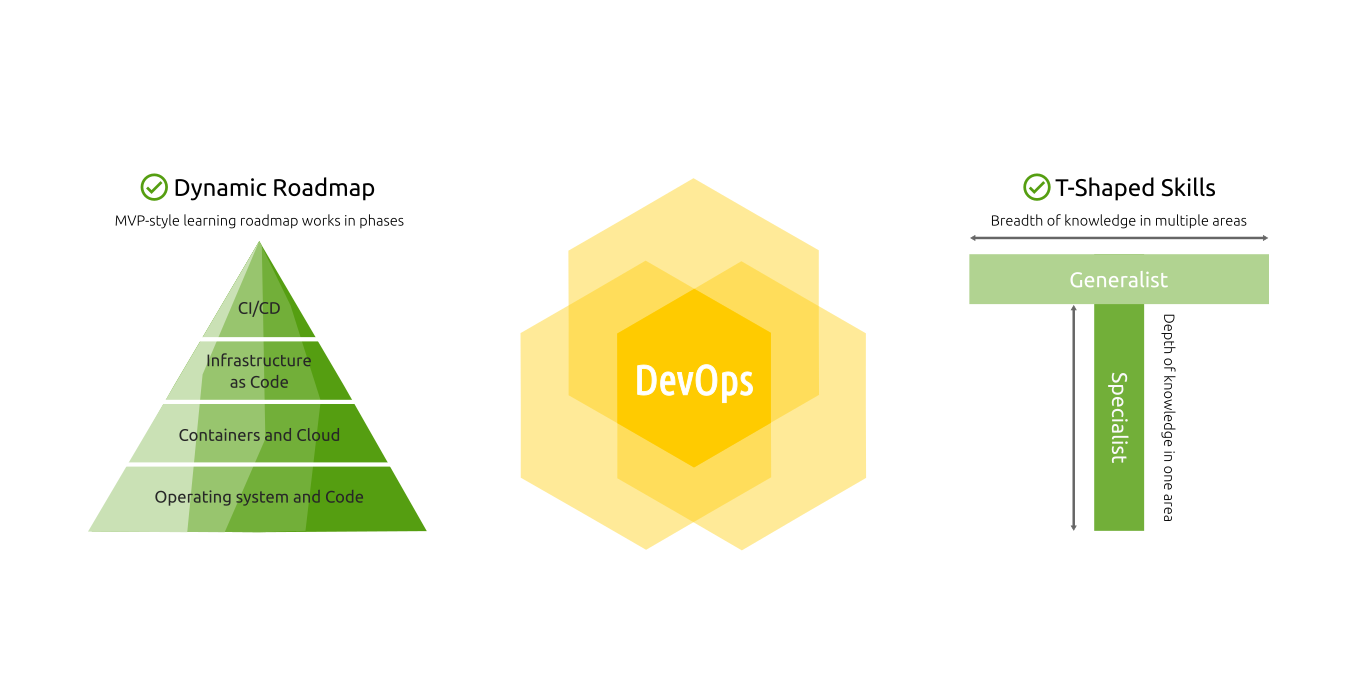
Here is another story of why I always advise DevOps Engineers to have T-Shaped skills to enhance any step in the software production!

A cross-functional team gathered during a Kaizen Event to enhance the Camunda documentation for the remarkable Camunda 8.8 release. Besides the content, I worked on some enhancements of the search functionality to provide the best experience when using the official documentation (for the end users and developers as well).

TL;DR

The main 3 enhancements are:

  • Updated the DocSearch Crawler config for better search results (that's actually the most critical fix; we had an old config that led to bad search results).
  • Supported custom page rank, so we can set important pages to show first (we know our docs better than the indexing algorithm!).
  • Showed the page breadcrumb paths for better search navigation and usability (a small UI change but huge UX impact!).

As Camunda works in public, you can see my pull request in the Camunda Docs repo with all changes 🚀

1. Overview

Docusaurus is one of the famous static content management systems, which helps you to build documentation websites, blogs, marketing pages, and more. It's widely used for documentation by many companies and open-source projects (I even used it in the Dynamic DevOps Roadmap).

Docusaurus search support mutliple options like Algolia DocSearch, Typesense DocSearch, Local Search, etc. Each search module has a different configuration, and your project's search results could be affected by the module's configuration.

2. The Problem

Camunda documentation utilizes Algolia DocSearch; however, at a certain point, the search returned generic results, important pages were buried, and even if you're certain the content is there, you can't find it via the search.

3. The Solution

To get quick and solid results, I've narrowed down scope the focus area to 3 pain points:

  • How to show better search matching.
  • How to show important pages first, regardless of the indexing algorithm.
  • How to show the page path in the search dialog (because many pages could have the same title but under different sections).

3.1 DocSearch Crawler Configuration

As mentioned, the search matching was poor, but it worked well at a certain point in the past. That's a typical signal of an upgrade issue.

And, as usual, always read the documentation! Directly I've found that the DocSearch crawler configuration has some issues and it doesn't match the DocSearch official recommendations for Docusaurus v3.

That fixed most of the bad search matching because the index created by the crawler was misconfigured.

3.2 Custom Page Rank

We know our product better than any indexing algorithm, so for some pages, we know they are more critical than others and should appear first for certain keywords.

For that, I introduced a method to set the page rank from the pages Front matter which requires 2 changes.

First, a change in the index template src/theme/DocItem/Metadata/index.tsx to parse the front matter and add it as metadata:

// TypeScript Execute

// Get the page rank from front matter, defaulting to 0 if not set.
// Higher page rank means higher priority in search results.
// This is parsed by Algolia's crawler to prioritize search results.
const pageRank = currentDoc.frontMatter.page_rank || 0;

return (
    <>
        <Metadata {...props} />
        <Head>
        <meta name="docsearch:page_rank" content={pageRank} />
        </Head>
    </>
);

Second, updated the DocSearch Crawler configuration to use that metadata in the indexing:

// JavaScript
new Crawler({
  // [...]
  actions: [
    {
      // [...]
      recordExtractor: ({ $, helpers, url }) => {
        // Page rank.
        // Use the page rank from the Docusaurus frontmatter if available, if not
        // calculate it based on the URL depth.

        // Extracting the page rank from a meta tag (it's set by the Docusaurus pages frontmatter).
        const pageRank = $("meta[name='docsearch:page_rank']").attr("content");
        // Set default page rank based on the number of slashes (ignore trailing slash).
        // Set pageRank as inverse of depth, fewer slashes = higher rank.
        const path = new URL(url).pathname.replace(/\/$/, "");
        const depth = path.split("/").filter(Boolean).length;
        const maxDepth = 12; // Depth cap.
        const defaultPageRank = Math.max(0, maxDepth - depth);

        return helpers.docsearch({
          recordProps: {
            pageRank: pageRank || defaultPageRank,
            // [...]
          },
        });
      },
    },
  ],
);

Now, on any page, if the rank is not set, it will rely on the page depth; otherwise, the team can set the page rank for the important pages in the front matter like this:

<!-- Markdown -->
---
sidebar_label: Kubernetes with Helm
title: Camunda Helm chart
page_rank: 80
---

The page content goes here...

3.3 Page Breadcrumb Path

By default, the DocSearch official recommended template for Docusaurus v3 doesn't display the page hierarchy in the search window.

The issue arises from the fact that many projects are hierarchical, and the same page title could be listed under different sections (e.g., for setting up a specific task using Helm or AWS EC2 instances, the first is categorized under Kubernetes and the second under Amazon as a cloud provider).

For a better navigation and usability, I included the page path in the Algolia search index. The idea is simple; it requires 2 changes.

First, ensure the breadcrumbs config is enabled (it's enabled by default).

Second, include the page breadcrumb path in the level 0 in the DocSearch Crawler configuration so it shows in the search:

// JavaScript
new Crawler({
  // [...]
  actions: [
    {
      // [...]
      recordExtractor: ({ $, helpers, url }) => {
        // Extracting the breadcrumb titles for better accessibility.
        const navbarTitle = $(".navbar__item.navbar__link--active").text();
        const pageBreadcrumbTitles = $(".breadcrumbs__link")
          .toArray()
          .map((item) => $(item).text().trim())
          .filter(Boolean);
        const lvl0 = [navbarTitle, ...pageBreadcrumbTitles].join(" / ") || "Documentation";

        return helpers.docsearch({
          recordProps: {
            lvl0: {
              selectors: "",
              defaultValue: lvl0,
            },
            // [...]
          },
        });
      },
    },
  ],
);

And the result is that the page path shows in the search window (TBH, this should be the default! So I've created a pull request to include it in the DocSearch repo):

4. Conclusion

As a DevOps Engineer, your focus should always be on the end-to-end software production process, with a customer-centric approach, not just a part of the process. For that reason, you should possess T-Shaped skills that enable you to handle any case and improve the UX on all levels.

I already discussed why your DevOps learning roadmap is broken and what to do about it.

Happy DevOps-ing :-)

Continue Reading »

07/07/2025

06/06/2025

Automate adding vCluster to Argo CD using External Secrets Operator - GitOps

Overview

In KubeZero (an open-source out-of-the-box Platform Orchestrator with GitOps designed for multi-environment Cloud Native setup), virtual clusters are created using vCluster. The main GitOps tool used in KubeZero is Argo CD, so we needed to automate provisioning the cluster and adding it to Argo CD.

If you used Argo CD before, you probably know that Argo CD provides a method for declarative setup (like for GitOps) where you can add new K8s clusters credentials by storing them in secrets, just like repositories or repository credentials.

However, to automate that, you need some way to extract the vClusters credentials and format them as an Argo CD config. There are many ways to do that, I prefer to use a declarative method, which is External Secrets Operator, namely PushSecret and ClusterSecretStore.

Flow

The flow is simple: when a K8s cluster is created via vCluster, the cluster credentials are created as a Secret object in the same namespace as the virtual cluster. Then, using PushSecret templating capabilities, it will read the secret, reformat it, and then push it to the Argo CD cluster using ClusterSecretStore.

vCluster supports multiple installation methods. We use vCluster Helm chart, so the PushSecret is created within the Helm chart to further automate it. Using Helm here is not mandatory; you can use any other installation method you like.

Prerequisites

Assuming you deploy the virtual cluster using vCluster (v4.3.0) Helm chart, you just need this extra Helm values file (here I just copy the example from KubeZero repo):

---
experimental:
  deploy:
    host:
      manifestsTemplate: |
        ---
        # Push the vCluster credentails to KubeZero ClusterSecretStore,
        # which will save it as a Secret in the KubeZero namespace to be used as an Argo CD cluster config
        # (just a secret with a specific label).
        # https://argo-cd.readthedocs.io/en/stable/operator-manual/declarative-setup/#clusters
        apiVersion: external-secrets.io/v1alpha1
        kind: PushSecret
        metadata:
          name: argo-cd-{{ .Release.Name }}-credentials
          namespace: {{ .Release.Name }}
        spec:
          refreshInterval: 5m
          secretStoreRefs:
            - name: kubezero-management
              kind: ClusterSecretStore
          selector:
            secret:
              name: vc-{{ .Release.Name }}
          data:
            - match:
                secretKey: name
                remoteRef:
                  remoteKey: argo-cd-{{ .Release.Name }}-credentials
                  property: name
            - match:
                secretKey: server
                remoteRef:
                  remoteKey: argo-cd-{{ .Release.Name }}-credentials
                  property: server
            - match:
                secretKey: config
                remoteRef:
                  remoteKey: argo-cd-{{ .Release.Name }}-credentials
                  property: config
          template:
            engineVersion: v2
            metadata:
              annotations:
                managed-by: external-secrets
              labels:
                argocd.argoproj.io/secret-type: cluster
            data:
              name: {{ .Release.Name }}
              server: https://{{ .Release.Name }}.{{ .Release.Namespace }}.svc:443
              config: |
                {
                  "tlsClientConfig": {
                    "insecure": false,
                    "caData": "{{ printf "{{ index . "certificate-authority" | b64enc }}" }}",
                    "certData": "{{ printf "{{ index . "client-certificate" | b64enc }}" }}",
                    "keyData": "{{ printf "{{ index . "client-key" | b64enc }}" }}",
                    "serverName": "{{ .Release.Name }}"
                  }
                }

That will create the reformated Secret object in the Argo CD namespace, where the Argo CD controller will read it as an config because of the lable argocd.argoproj.io/secret-type: cluster. The actual output will be something like this:

apiVersion: v1
kind: Secret
metadata:
  annotations:
    managed-by: external-secrets
  labels:
    argocd.argoproj.io/secret-type: cluster
  name: argo-cd-k0-credentials
  namespace: argo-cd
# The base64 is decoded for the sake of the example.
data:
  name: argo-cd-k0
  server: https://argo-cd-k0.mgmt-demo.svc:443
  config: |
    {
      "tlsClientConfig": {
        "insecure": false,
        "caData": "<base64 encoded from vCluster secret>",
        "certData": "<base64 encoded from vCluster secret>",
        "keyData": "<base64 encoded from vCluster secret>",
        "serverName": "argo-cd-k0"
      }
    }

That's it! Enjoy, and don't forget to star the KubeZero project on GitHub :-)

Continue Reading »

05/05/2025

How to define GitHub Actions multiline environment variable or output - CI/CD

I'm not sure if that was a hack or undocumented feature, but I can find it now in the GitHub Actions docs.

But in the past, I needed to copy a short multiline file between GitHub Actions jobs, and I didn't want to bother with extra steps of stash/unstash stuff, so I found that you can define a multiline GitHub Actions variable!

It was as easy as this:

jobs:
  job1:
    runs-on: ubuntu-latest
    steps:
      - name: Set multiline value in bash
        run: |
          # The curly brackets are just Bash syntax to group commands
          # and are not mandatory.
          {
              echo 'JSON_RESPONSE<<EOF'
              cat my-file.json
              echo EOF
          } >> "$GITHUB_OUTPUT"

Of course, you need to be sure that the delimiter EOF doesn't occure within the value.

Then you can call that again as:

[...]
  job2:
    needs: job1
    runs-on: ubuntu-latest
    steps:
      - name: Get multiline value in bash
        run: |
          echo "${{ needs.job1.outputs.JSON_RESPONSE }}"

That's it! Enjoy! ♾️

Continue Reading »

04/04/2025

03/03/2025

Research Paper: Building a Modern Data Platform Based on the Data Lakehouse Architecture and Cloud-Native Ecosystem

Building a Modern Data Platform Based on the Data Lakehouse Architecture and Cloud-Native Ecosystem

Finally, after months of hard work, I have published my first research paper in a double-blind peer-reviewed scientific journal by the international publisher Springer Nature 🙌

The paper is titled:

Building a Modern Data Platform Based on the Data Lakehouse Architecture and Cloud-Native Ecosystem

This research paper is the result of several months of work and is based on my master's thesis, which was published in 2023 (I got Master of Science with Distinction in Data Engineering from Edinburgh Napier University).

The paper presents a practical application for data management without vendor lock-in, in addition to ensuring platform extensibility and incorporating modern concepts such as Cloud-Native, Cloud-Agnostic, and DataOps.

Why is this paper important? Because data is the backbone of Artificial Intelligence! In today's world, control over data means political and economic independence.

I would like to extend my sincere gratitude to the research team who contributed to this work, supported me, and shared their knowledge to help bring this paper to the highest quality. It was a truly enriching experience on many levels! 🙌

  • Dr. Peter Barclay: Head of the Data Engineering program at the School of Computing, Edinburgh Napier University.
  • Dr. Nikolaos Pitropakis, PhD: Associate Professor of Cybersecurity at the School of Computing, Edinburgh Napier University.
  • Dr. Christos Chrysoulas: Associate Professor in Software Engineering at Heriot-Watt University.

The research group chose these quotes from our respective languages/cultures to emphasize the importance of perseverance and diligence:


“عِندَ الصَّباحِ يَحمَدُ القومُ السُّرَى”
(In the morning, the people praise the night's journey)
Arabic Proverb

“Αρχή ήμισυ παντός”
(The beginning is half of everything)
Greek Proverb

“Is obair latha tòiseachadh”
(Beginning is a day's work)
Scottish Gaelic Proverb


I will write a community blog post about it soon :-)

Continue Reading »

22/02/2025

How Open Source Helped Me Step Up My DevOps Career - Presentation

2 days ago (20.02.2025), it was a pleasure to participate in the Open Source Summit 2025 in KSA.

My session was about participating in Open-source and how it helps to be a better DevOps engineer. In fact, the best DevOps engineers I have encountered possess T-shaped skills that require diving into many areas, even outside of the daily work topics.

How Open Source Helped Me Step Up My DevOps Career

It was nice to reflect on all those years of professional work and open-source contributions 🤩

Continue Reading »

11/01/2025

How to start your DevOps career in 2025 - Podcast

I had a nice podcast with Ahmed Elfakharany part of his Tech Podcast in Arabic about how to start the DevOps career and how to exell in it. The podcast was mainly about the Dynamic DevOps Roadmap.

Watch the full session on YouTube: How to start your DevOps career (Arabic)

Enjoy :-)

Continue Reading »

31/12/2024

2024 Highlights

Finally, 2024 is over! Another crazy year but I like it! 🤩 This year was a bit chill compared to previous ones, but also I did many new things.

Top 5 highlights in 2024

1. Career

In 2022, I formed the Distribution team at Camunda, which is responsible for building and deploying the Camunda Platform 8 Self-Managed, which is an umbrella Helm chart with 10+ systems. In 2023, the main mission was to increase the team size to 4. In 2024, the onboarding was done for all members, and the team became more autonomous and worked at full capacity. I like the process of building and leading the team and am excited for the next steps in 2025. 🤩

2. Dynamic DevOps Roadmap

Dynamic DevOps Roadmap

In 2023, I wrote why the DevOps linear roadmaps are broken by default and then sow the seed of the Dynamic DevOps Roadmap to become a DevOps Engineer.

In 2024, I finished 100% of the roadmap and launched the roadmap website, making reading and following progress much easier. I'm pretty happy that many people like the approach of that roadmap instead of other roadmaps that list tons of DevOps tools! (which doesn't really work!). Here are some other highlights:

  • The roadmap repo got more than 1.6k stars on GitHub.
  • Added around 250 quiz questions (embedded in each module).
  • Added around 200 general interview questions.
  • Added interview best practices, which are the same as important as technical skills.
Experience-Driven DevOps: Beyond Tools, Where Concepts Meet Real-World Challenges

A FREE pragmatic DevOps roadmap to kickstart your DevOps career in the Cloud Native era following the Agile MVP style! A DevOps Engineer or Software Engineer, this roadmap is all that you need to start, grow, and expand!

3. Public Speaking

This year, I conducted some nice sessions (in Arabic) with awesome people.

As usual, JobStack_ continues to set the bar higher each year! It is an unmissable event for tech enthusiasts. I really enjoyed participating as both a speaker and a listener. 🤩

In November, I had 2 sessions, the kick-off and another specialized in DevOps.

Also, in December, I participated in a live podcast with Ahmed Elemam covering ⭐ How to start with the Dynamic DevOps Roadmap.

4. Activities

Besides these highlights, I had some nice stuff during the year. For example:

  • Updated my main website aabouzaid.com, listed my projects, blog posts, publications, tech talks, and more.
  • Traveled to 3 countries, Oman, Saudi Arabia, and Dominican Republic to attend tech and work-related events. I also had the chance to meet a lot of friends in those travels. Saudi Arabia wasn't my first time there, but the last time was too long ago, happy to be back again. 🤩
  • After 5 years of OnePlus 6, I got a new phone. First, I tried for a couple of months Samsung Galaxy S23 Ultra, a great device but super heavy! So I swtiched to Samsung Galaxy S24, which is high-quality and perfect in size.
  • Since 2020, I've been using the ergonomic mouse (standard vertical) and keyboard (Microsoft Sculpt) and totally like them. Recently, I changed the mouse to Logitech MX Vertical. It's pretty good for me; my only concern is that the clicks are a bit noisy!
  • Lost some weight, which is great 😄

And since we are on this topic, here are the top 5 visited blog posts in 2024!

Top 5 posts in 2024

  1. 2 ways to route Ingress traffic across namespaces - Kubernetes
  2. How to create Makefile targets with dynamic parameters and autocompletion - Make
  3. Validate, format, lint, secure, and test Terraform IaC - CI/CD
  4. Your DevOps learning roadmap is broken! - Career
  5. 3 ways to customize off-the-shelf Helm charts with Kustomize - Kubernetes

Almost the same as last year, 2023, DevOps, Kubernetes, and Kustomize posts are still in the top.

What's next?

As usual, I don't plan the whole year in advance, I just put some high-level directions then work on them as I go in Agile iterative style (yes, I use Agile for personal goals too).

What I know, I will focuse on growing the Dynamic DevOps Roadmap community and work on the Career Growth and Advanced Topics section.

Previous Years


Enjoy, and looking forward to 2024! 🤩

Continue Reading »

12/12/2024

How to be a good DevOps Engineer - Podcast

Two days ago, I had a nice podcast with Ahmed Elemam part of his Tech Podcast in Arabic about how to be a good DevOps Engineer and how to exell in that domain. The podcast was mainly about the Dynamic DevOps Roadmap.

Watch the full session on YouTube: How to be a good DevOps Engineer (Arabic)

Enjoy :-)

Continue Reading »

08/08/2024

Bootstrap Cloud-Native bootstrappers like Crossplane with K3d - Automation

Crossplane Bootstrapper
I created a logo for the Crossplane Bootstrapper because all good projects deserve a logo. 😁

TL;DR

My contribution to K3d to support embedded files was one of the smoothest open-source contributions, although I needed to refactor my PR fully! I did that happily, thanks to the fruitful discussion with the K3d creator and maintainer, Thorsten Klein 🙌

Let's dive into that a bit more using the STAR method.

Situation

It has always been challenging to initiate the initiator dilemma (the same as Infinite regress in philosophy). For example, what will monitor the monitoring system? Or What will backup the backup system?

The same applies to Cloud-Native tools that run only on Kubernetes, where you need an initial Kubernetes cluster to run those bootstrapping tools to create your resources (like Argo CD and Crossplane).

Task

I wanted to fix this issue once and for all! (a generic way that works with many tools) I found that the best way to do that is to have a declarative way to setup the initial local cluster, which will create the Cloud resources afterward.

Action

I've reviewed a couple of tools and found the best tool to achieve that is K3d, a wrapper around K3s, a Rancher's lightweight Kubernetes distribution. It's like KIND but way more customizable (e.g., it comes with a built-in Helm controller).

In March 2024, I made a K3d PR that added functionality to embed manifests in the K3d cluster configuration. Now, we can have one file to bootstrap the local cluster with bootstrapping tools ready to provision your Cloud resources.

In July 2024, K3d 5.7.0 was released with my feature, so I can use it to bootstrap Crossplane instead of a bunch of Makefiles.

I also created Crossplane Bootstrapper, which makes that process even easier.

Result

With my new feature, it's possible to have 1 YAML file using 1 tool to bootstrap the initial cluster, which will create the reset of your Cloud resources.

Here is an example from Crossplane Bootstrapper. That solution works with any tool (e.g., Argo CD). It also supports external files, which is better for linting and so on.

---
apiVersion: k3d.io/v1alpha5
kind: Simple
metadata:
  name: crossplane-bootstrapper

# Cluster resources.
servers: 1
agents: 1

# Auto deployed manifests.
files:
  - description: Setup Crossplane
    destination: k3s-manifests/crossplane-bootstrapper.yaml
    nodeFilters:
      - "server:*"
    # Source as a file.
    # source: manifest-crossplane-bootstrapper.yaml
    # Source as an embedded manifest.
    source: |
      ---
      apiVersion: v1
      kind: Namespace
      metadata:
        name: crossplane-system
      ---
      # Install Crossplane.
      apiVersion: helm.cattle.io/v1
      kind: HelmChart
      metadata:
        name: crossplane
        namespace: crossplane-system
      spec:
        repo: https://charts.crossplane.io/stable
        chart: crossplane
        targetNamespace: crossplane-system
        valuesContent: |-
          provider:
            packages:
            # Docs: https://marketplace.upbound.io/providers/upbound/provider-family-gcp
            - "xpkg.upbound.io/upbound/provider-gcp-gke:v1.0.2"
          configuration:
            packages:
            # Docs: https://marketplace.upbound.io/configurations/upbound/platform-ref-gcp
            - "xpkg.upbound.io/upbound/platform-ref-gcp:v0.9.0"
      ---
[...]

That's it! Happy DevOpsing :-)

Continue Reading »

07/07/2024

Gomplate v4 is here! - Tools

gomplate logo

This year, one of my nice discoveries was gomplate, a fast template renderer supporting many data sources and hundreds of functions.

And finally, gomplate v4 was released in June 2024. It has many excellent new features and additions (v3 was released in 2018!).

I will not really cover much here as it has extensive documentation. The most basic example could be:

echo 'Hello, {{ .Env.USER }}' | gomplate
Hello, ahmed

But I totally like the idea of the separation between data input (data source) and rendering, so I can generate the data with any tool and then just leave the rendering to gomplate like:

Template file:

{{- $release := ds "release" -}}
{{- with $release -}}
Version: .version
{{- end -}}

Rendering command:

RELEASE_DATA_JSON='{"version": "1.0.0"}'
gomplate \
    --config .gomplate.yaml \
    --file RELEASE.md.tpl \
    --datasource release=env:///RELEASE_DATA_JSON?type=application/json

Of course, that's still super basic, but the idea here is that I could generate the data of env var RELEASE_DATA_JSON or even generate a JSON file and read it in gomplate.

What's better? It's already available in asdf! Just add it directly or declaratively via asdf plugin manager.

asdf plugin-add gomplate

If you want a decent tool for templating, then gomplate is your tool to go.

Enjoy :-)

Continue Reading »

06/06/2024

31/12/2023

2023 Highlights


Image generated with Craiyon.

Finally, 2023 is over! What a year! One more crazy year, but it was the culmination of many actions I've started previously.

Starting with the fun facts ... this is the post no. 100!

After 9 years of tech blogging in English (I had another 10 in Arabic before that). It should be 108 posts since the plan was to post 1 per month, but I missed some, still not bad!

Top 5 highlights in 2023

1. Career

Image by vectorjuice on Freepik

In 2022, I formed the Distribution team at Camunda which is responsible for building and deploying the Camunda Platform 8 Self-Managed which is an umbrella Helm chart with 10+ systems. In 2023, the biggest challenge was increasing the team headcount to 4 and building the workflow to handle that!

2. Academia

I've always been into data! So in 2020, I started a part-time master's in Data Engineering at Edinburgh Napier University. After almost 3 years, I was awarded a Master of Science with Distinction in Data Engineering 🎉. In June, I got the result after I successfully defended my dissertation titled Modern Data Platform with DataOps, Kubernetes, and Cloud-Native Ecosystem. Then in October, I traveled to Scotland to attend the graduation ceremony. All I can say today is that it was a great experience by all means! (and that's actually why I had some unusual gaps in blog posts in 2023 because I was working on the master's thesis).

3. Mentorship

Dynamic DevOps Roadmap

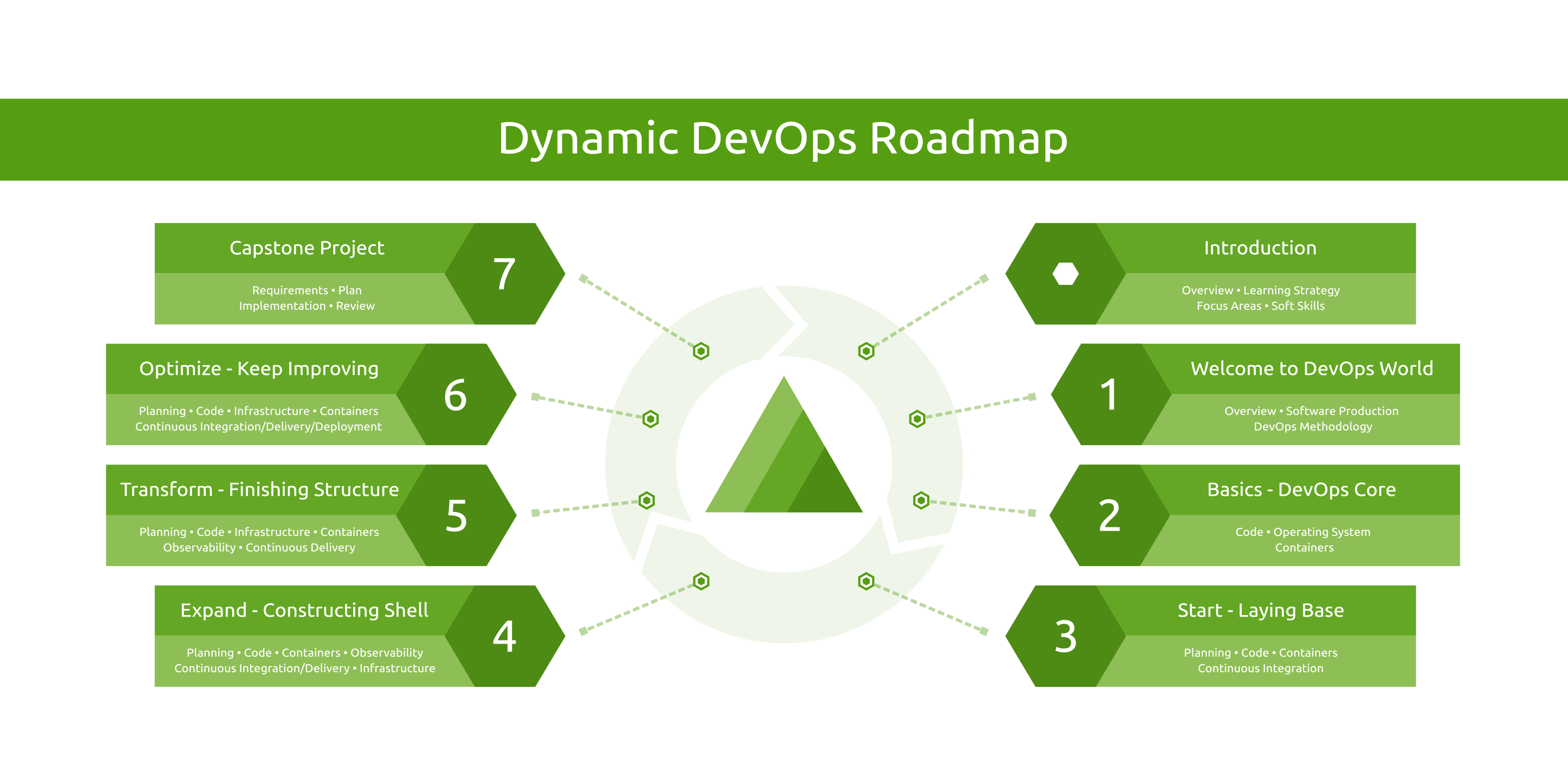
In the last 5 years, I mentored many people in different career stages (starting their first job, career shift, moving to another work style or company). Almost every day, I see people struggling on their way to the DevOps field. I already wrote why the DevOps linear roadmaps are broken by default! So I decided to fix that and launched a Dynamic DevOps Roadmap to become a DevOps Engineer which under the DevOps Hive identity! The nice thing that I saw many people already like the idea and want to do it that way!

ℹ️ Check out the Dynamic Roadmap content ℹ️

4. Public Speaking

Jobstack is one of my favorite tech events all the time! And as usual, this year was awesome! As a speaker, I had 2 sessions, and as an attendee, I enjoyed many sessions on different topics.

5. Activities

Besides these highlights, I had some nice stuff during the year. For example:

And since we are on this topic, here are the top 5 visited blog posts in 2023!

Top 5 posts in 2023

  1. 2 ways to route Ingress traffic across namespaces - Kubernetes
  2. Validate, format, lint, secure, and test Terraform IaC - CI/CD
  3. Your DevOps learning roadmap is broken! - Career
  4. Delete a manifest from Kustomize base - Kubernetes
  5. 3 ways to customize off-the-shelf Helm charts with Kustomize - Kubernetes

The same as last year, 2022, Kustomize posts are still in the top; that's because there is not much content about it even though it's built-in kubectl now! (since v1.14). That's why I created a Kustomize Awesome list, which is a curated and collaborative list of awesome Kustomize resources.

But this year, 2023, for the first time, a blog post posted in the same year appears in the top 5 posts! Which is discussing how the linear DevOps learning roadmap is broken by default! That's why I had a follow-up post showing the solution that suggests a better way to Become a DevOps Engineer with the Dynamic DevOps Roadmap. ⭐

What's next?

As usual, I don't plan the whole year in advance, I just put some high-level directions then work on them as I go in Agile iterative style (yes, I use Agile for personal goals too).

What I know already is that I need to reward myself and take a good break after the master 😁

Also, I want to put more effort to grow the DevOps Hive community to help more people to land their first DevOps Engineer role!


Enjoy, and looking forward to 2024!

Continue Reading »

12/12/2023

Become a DevOps Engineer with the Dynamic DevOps Roadmap - Career

Dynamic DevOps Roadmap

A couple of months ago, I discussed why all linear DevOps learning roadmaps are broken by default (like roadmap.sh/devops)! In that post, I've discussed the issue, where it comes from, and the solution I tried for over 5 years!

The solution is simply switching to an MVP-style learning roadmap where you learn in iterations and touch multiple parts simultaneously (not necessarily equally). Each iteration should focus on a primary topic while exploring related side topics. So after a month, you already know about each topic in the roadmap, and after the 2nd month, you have the basics, and after the 3rd month, you have a good base, and so on.

Based on my mentorship experience in the last 5 years, I've concluded that any "tool-based" approach to deal with DevOps will fail miserably. The Cloud-Native landscape is getting bigger and bigger every day, and there is no way to deal with it that way.

For that reason, I've reviewed all docs from the previous mentorship docs I held in the past (I worked with people starting their first job, career shift, or moving to another work style or company) and built the ultimate missing solution!

⭐ Check out the Dynamic Roadmap content ⭐

This roadmap is polymorphic, which means it's designed to work in different modes. It depends on how fast you want to go.

  1. Self-Learning Course: In this mode, you are not expected to have DevOps experience, and you want to go from zero to hero, transforming your knowledge to land your first job as a DevOps Engineer.
  2. Hands-on Project: In this mode, you have some experience with DevOps (usually between 1-2 years of work experience), but you want to step up your skills with real hands-on industry-grad projects to learn DevOps in a pragmatic manner.
  3. Mentorship Program: In this mode, the previous two modes are covered (that means it could be only for the project or the whole roadmap) but with support from a mentor! The project will provide you with a DevOps expert who will guide you in following up on your progress and personalizing your learning plan.

The whole idea is about the Learning by Doing method (aka Problem-based Learning), which is done in iterative phases where you learn as you go and cover the whole DevOps cycle like Code, Containers, Testing, Continuous Integration, Continuous Delivery, Observability, and Infrastructure.

The project is a work in progress; more details are in the status section.

I hope that the project helps more people start their DevOps engineering careers! The market is thirsty for it already!

⭐ Check out the Dynamic Roadmap content ⭐

Happy DevOps-ing :-)

Continue Reading »

12/11/2023

DevOps is not only a culture - Discussion Panel

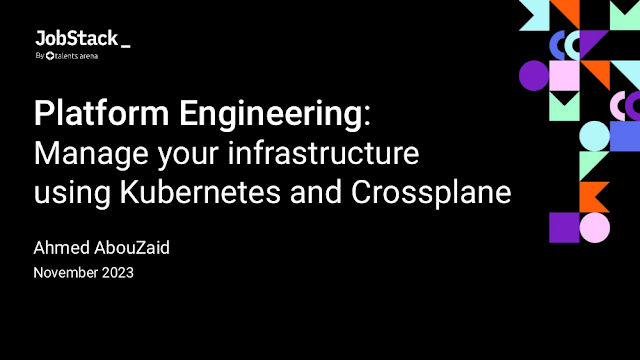
Today is my second session JobStack 2023 after my previous one yesterday titled "Platform Engineering: Manage your infrastructure using Kubernetes and Crossplane", but this time it was a discussion panel with Ahmad Aabed (CTO of Zyda).

For a long time, DevOps methodologies have been the driving force behind innovation and efficiency in modern software development. You've likely encountered the popular jargon: "DevOps is not a role; it is a culture"! However, the truth is that DevOps has much more!

This session dives deep into the pillars world of DevOps, going beyond the cultural aspect to explore practices, technology stacks, mindset, and more. This is an open discussion where we will share (and encourage you to do so) the experiences of implementing DevOps. In other words, what practical steps have you taken to embrace the power of DevOps in your organization?

A shot from the recoding

At the end, I'd like to share a couple of posts I wrote before in that regard (DevOps methodologies in action):

Enjoy :-)

Continue Reading »

11/11/2023

Platform Engineering: Manage your infrastructure using Kubernetes and Crossplane - Presentation

Just fresh out of the kitchen, part of JobStack 2023, today I conducted a session about a great tool ... Crossplane, the open-source control plane!

I've been using Crossplane for over a year and a half, and it helped me a lot to manage my infrastructure without the need to use Terraform (I still love Terraform, but it wasn't the best for my use case).

In this session I shed the light on how Crossplane could unify infrastructure management within Kubernetes.

I gave a brief how Crossplane extends the functionality of Kubernetes and allows you to create external infrastructure. You can create Cloud resources the same way you create Kubernetes resources! I really love its declarative, cloud-native, GitOps-friendly approach to code-driven infrastructure management.

Agenda:

  1. Scenario
  2. What is Crossplane?
  3. How it look like?
  4. Crossplane Concepts
  5. How Crossplane Works
  6. Pros and Cons
  7. Conclusion
  8. Resources
  9. Questions

Note: For more resources, checkout this Awesome Crossplane list.


A shot from the recoding 🙌
Watch the full session on YouTube: Platform Engineering: Manage your infrastructure using Kubernetes and Crossplane (Arabic)

Conclusion:

Crossplane is a great framework for managing infrastructure using the Kubernetes style and benefits from the that ecosystem (ArgoCD, Helm, Kustomize, etc.).

There are many use cases where it can perfectly fit in already. And at the time of writing these words (November 2023), the Marketplace has numerous enterprise and community providers configurations. Also, Composition Functions graduated to beta.

However, it's a relatively new ecosystem and still evolving, so it might not be the optimal solution for every workload. But it's probably a matter of time to grow more. So, if it's not your fit now, consider revisiting in the future.


That's it, enjoy :-)

Continue Reading »

09/09/2023

🔀Merger🔀, a schemaless strategic merge plugin - Kustomize

Kustomize is a great tool. I've been using Kustomize for almost 4 years and am happy with it. However, it's known for its strict merging methods, where it needs to have an OpenAPI schema to merge files properly.

There were many use cases where I needed a more flexible way to merge resources (away from Kustomize's strict merging). So, I've developed a new Kustomize generator plugin (Containerized KRM and Exec KRM) that extends Kustomize's merge strategies (schemaless StrategicMerge).

I wanted to:

  • Generate multiple resources from a single resource without the need to multi-import (you can patch multiple resources with a single patch but not the other way around)
  • An easy way to merge CustomResources without the need to provide the OpenAPI schema for it (that's actually a lot of work)
  • An easy way to merge non-k8s resources and put them in a ConfigMap.
  • A way to split long files into smaller ones.

...

Say Hi to 🔀Merger🔀

Merger is a generator provides schemaless merges with different strategies (StrategicMerge) like replace, append, and combine.

Here is an example:

apiVersion: generators.kustomize.aabouzaid.com/v1alpha1
kind: Merger
metadata:
  name: merge
    annotations:
      config.kubernetes.io/function: |
        container:
          image: ghcr.io/aabouzaid/kustomize-generator-merger
          mounts:
          - type: bind
            src: ./
            dst: /mnt
spec:
  resources:
  - name: example
    input:
      # Available options: overlay,patch.
      # - Overlay: Produce multiple outputs by merging each source with the destination.
      # - Patch: Produce a single output by merging all sources together then with the destination.
      method: overlay
      files:
        # The same as in the KRM container above, omit it if Exec KRM is used.
        root: /mnt
        sources:
        - src01.yaml
        - src02.yaml
        destination: dst.yaml
    merge:
      # Available options: replace,append,combine.
      # - Replace: All keys in source will merge and replace what's in the destination.
      # - Append: Maps from source merged with destination, but the lists will be appended from source to destination.
      # - Combine: Maps from source merged with destination, but the lists will be combined together.
      strategy: combine
    output:
      # Available options: raw.
      # In the next releases also ConfigMap and Secret will be supported.
      format: raw

For more details, check the common use cases section.

...

Some takeaways I learned while developing this project:

  • KubeBuilder markers could be used with the client side to auto-generate the OpenAPI YAML schema from the code.
  • Golang compression methods (like UPX and LZMA) can reduce the binary size up to 80% compared to the standard build method.
  • Cosign keyless artifacts sign is pretty easy to add to the CI pipeline (no need to manage any extra keys).
  • OpenSSF Scorecard offers a great integration assessing the security health metrics of open-source projects.

Enjoy :-)

Continue Reading »

08/08/2023

Helm chart keyless signing with Sigstore/Cosign - DevSecOps

Software supply chain security has been one of the hot topics because of the continues attacks and exploits shown in the latest few years. So having a proper security practices like signing artifacts in today's CI/CD pipeline is not a luxury! Which became a standard DevSecOps practice.

However, for a long time it needed a lot of work to implement those practices, hence, projects like Open Source Security Foundation (OpenSSF) which created security framework like Supply-chain Levels for Software Artifacts (SLSA) and Sigstore which created tools like Cosign to standardize and reduce that fatigue.

Today I want to shed some lights on Helm chart signing with Cosign (part of Sigstore project). This post will focus on GitHub Actions and 2 ways for Helm chart signing based on the type of the Helm registry (simple or OCI-based).

1. Intro

Before starting, what is actually Cosign? I will start with quoting from the project website:

Cosign is a command line utility that can sign and verify software artifact, such as container images and blobs.

Cosign aims to make signatures invisible infrastructure, and one of its main features what's known as "Keyless signing". Keyless signing means rather than using keys like GPG/PGP, it uses associates identities via OpenID Connect (i.e. it auth against providers like Microsoft, Google, and GitHub to issues short-lived certificates binding an ephemeral key).

Cosign could be used as a CLI also integrated part of other build/release tools like GoReleaser.

2. Identity setup

As mentioned, no need for signing keys here, Cosign will use the identity context like GitHub. Let's take GitHub Actions as a base here, but it is worth mentioning that Cosign works with many identity providers.

From the GitHub Actions workflow point of view, you just need to have job permission id-token: write, which allows the job to use OICD and generate JWT (which works as a key).

name: Sign Helm chart artifact
[...]
jobs:
  sign:
    name: Sign
    permissions:
      id-token: write
    [...]

You can find a full example in the repo: https://github.com/DevOpsHiveHQ/cosign-helm-chart-keyless-signing-example

3.1. Keyless signing for simple Helm repository

A simple Helm repository is just a file called index.yaml which reference to the actual chart files URLs. A popular way for that is using Chart Releaser to host the Helm charts using GitHub Pages and Releases.

The simplest way to sign Helm chart using Cosign is to sign the artifact then upload the signature to GitHub release page.

First, sign the chart file:

# For explicitly, it's also possible to add '--oidc-provider=github-actions',
# but no need for that, cosign will discover the context if the GH job permission is correct.
cosign sign-blob my-app-1.0.0.tgz --bundle my-app-1.0.0.tgz.cosign.bundle

That will create a bundle file my-app-1.0.0.tgz.cosign.bundle which contains signing metadata like the signature and certificate (also it's possible to have separate sig and pem files) which should be uploaded to GitHub release page.

Now anyone can download the Helm chart file and Cosign bundle file to verify its integrity:

cosign verify-blob my-app-1.0.0.tgz \
  --bundle my-app-1.0.0.tgz.cosign.bundle \
  --certificate-oidc-issuer "https://token.actions.githubusercontent.com" \
  --certificate-identity "https://github.com/DevOpsHiveHQ/cosign-helm-chart-keyless-signing-example/.github/workflows/sign.yaml@refs/heads/main"

If the file is valid the command will show Verified OK, otherwise it will show something like Error: none of the expected identities matched what was in the certificate ....

On the other hand, that's still some work! Maybe if Chart Releaser has a native support for Cosign. Also, the Helm plugin helm-sigstore could help a bit but you need to download the Helm plugin first.

3.2. Keyless signing for OCI-based Helm repository

Using container image to store config like Helm chart or Terraform module is one of the brilliant ideas.

One of the biggest changes in Helm 3 was ability to use container registries with OCI support to store and share chart packages. It started as an experimental feature, but by Helm v3.8.0, OCI support is enabled by default.

So instead that simple index.yaml an OCI-based registry could be used as a Helm repository and chart storage too. Any hosted registries that support OCI will work for that like Docker Hub, Amazon ECR, Azure Container Registry, Google Artifact Registry, etc.

In that setup, Cosign works a bit differently where it signs the chart as an OCI image (the same way it signs the Docker images) and store the signature in the OCI repository. But in that case it only makes sense to sign the digest not the tags since the digest is immutable.

There are two steps to make that, first push the chart to an OCI-based Helm repository which generates the chart digest, then push the signed digest.

# After login to the registry using "helm registry login ...".
helm push my-app-1.0.0.tgz oci://ttl.sh/charts &> push-metadata.txt

CHART_DIGEST=$(awk '/Digest: /{print $2}' push-metadata.txt)
cosign sign -y "ttl.sh/charts/my-app@${CHART_DIGEST}"

Finally, to verify that:

cosign verify "ttl.sh/charts/my-app@${CHART_DIGEST}" \
  --certificate-oidc-issuer "https://token.actions.githubusercontent.com" \
  --certificate-identity "https://github.com/DevOpsHiveHQ/cosign-helm-chart-keyless-signing-example/.github/workflows/sign.yaml@refs/heads/main"

4. Recap

Nowadays, it's critical to have standard DevSecOps practices in the whole SDLC, and validating integrity is one of the most essential practices in securing the software supply chain.

Any publicly distributed artifact should be signed to ensure the origin of it, and Helm charts are no different. Cosign keyless signing made it much easier to apply such practices without the hassles of managing singing keys.

Continue Reading »
Powered by Blogger.

Hello, my name is Ahmed AbouZaid, I'm a passionate Tech Lead DevOps Engineer. 👋

I specialize in Cloud-Native and Kubernetes. I'm also a Free/Open source geek and book author. My favorite topics are DevOps transformation, DevSecOps, automation, data, and metrics.

More about me ➡️

Contact Me

Name

Email *

Message *

Start Your DevOps Engineer Journey!

Start Your DevOps Engineer Journey!
Start your DevOps career for free the Agile way with the Dynamic DevOps Roadmap ⭐

My Latest Peer-reviewed Research Paper

My Latest Peer-reviewed Research Paper
Building a Modern Data Platform Based on the Data Lakehouse Architecture and Cloud-Native Ecosystem

Latest Post

10 Helm Chart Development Best Practices - Kubernetes

About 10 years ago, I used SaltStack extensively and wrote my top 10 best practices for SaltStack formulas . Today, I do the ...

Popular Posts

Blog Archive